Guidance on how to administer DMPonline.be for your organisation.
- Introduction
- User management
- DMP storage
- DMP templates
- What types of templates are available?
- How is a template structured?
- What are the components of a template?
- How can I modify/customise a template?
- How can I create conditional questions?
- What types of guidance are available?
- Do Admin Users control which templates can be used by Users within their own organisation? Can Admin Users add their own templates?
- Guidance
- Validation, lifecycle and lists
Introduction
The following documentation is intended for organisational administrators of DMPonline.be, that is, users in member institutions with Admin privileges. It lays out the specific actions and settings Admins can manage.
User management
What are the different types of users?
There are 3 types of users:
- Admin users
- End users of Belnet’s client institutions using DMPonline.be, mainly researchers.
- End users can create, edit, share, export and delete plans they own, and edit or consult plans that have been shared with them, depending on the level of permissions assigned by the plan owner.
Admin actions are detailed in “What rights do Admin users have?”
How are Admin users managed?
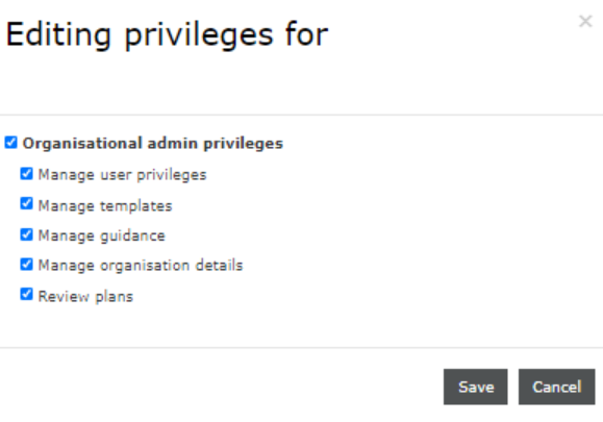
To become an admin, you must first activate your DMPonline.be account by logging in at least once. You can then be assigned admin rights in one of two ways:
- Belnet can assign admin rights to you if you are registered as a DMP contact person (by Belnet).
- An existing admin can assign admin rights to you.
There is no limit to the number of admins an organisation can have.
Users cannot be created manually by admins. A user must first register and log in before admin rights can be assigned to them.
What rights do Admin users have?
As an Admin within your institution, you will have access to an Admin menu in the top right corner of your screen:
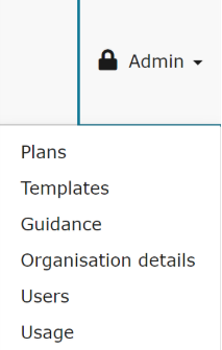
- Under the « Plans » tab, you can consult all the plans that have been created by users in your institutions.
- Under the « Templates » tab, you can:
- consult the list of templates created within your institution by clicking on « Own templates », or
- customise the templates by clicking on « Customisable Template ».
You can also copy templates and upload customisations. A template is a form containing questions about the management of search data (see DMP Templates section).
- Under the « Guidance » tab, you can create and customise guidance for different user groups within your organisation. Guidance consists of tips and instructions that help users answer the template questions, for example by explaining relevant institutional processes or requirements.
- Under the « Organisation details » tab, you can:
- customise the information on the DMPonline platform that is visible to users within your institution: organisation name, logo, relevant URLs, helpdesk and Admin contact emails, or a specific Google Analytics tracker code, and the necessary contact emails (e.g. the Admin’s email). This information is displayed in the header of the platform.
- activate, deactivate or customise the Request Feedback feature. When active, the Request Feedback feature enables all users to request feedback for a specific plan. This triggers a notification to Admins that a user needs feedback on their plan, which can then take place according to institutional processes if any.
-
On the « Users » tab, you can define the permissions, privileges and access of end users in your institution.
- On the « Usage » tab, you can view overall statistics on usage of the platform, that is, numbers of plans and users added per month, and download reports.
What are the tasks of an Admin User?
The tasks of an admin user depend on how the host institution is using DMPonline in their usual workflows. It can range from occasional feedback and user rights management over template maintenance to full-on guidance and template creation from scratch, if the institution is choosing to use institutional templates.
DMP storage
Where is the information entered in the DMPs stored, who can access it, how is it backed up, and how long is it stored?
Information from DMPonline is stored in the three Belnet datacenters in Diegem, Zaventem and Evere and cannot be accessed by other organisations. If people external to Belnet have access, it is covered by contract. Data is stored in the Belnet storage cluster, which is spread out over the three locations and backed up.
DMP templates
What types of templates are available?
By clicking on the “Reference” tab in the header menu, you will find different “funder templates” provided by default by your organisation. This list can vary according to the needs of end users and research groups.
For example, templates by: BELSPO (Belgian Federal Science Policy Office); FWO (The Research Foundation – Flanders); the DCC (Digital Curation Centre) Template; ELIXIR Belgium; the ERC (European Research Council); Horizon 2020 (European Commission) FAIR DMP.
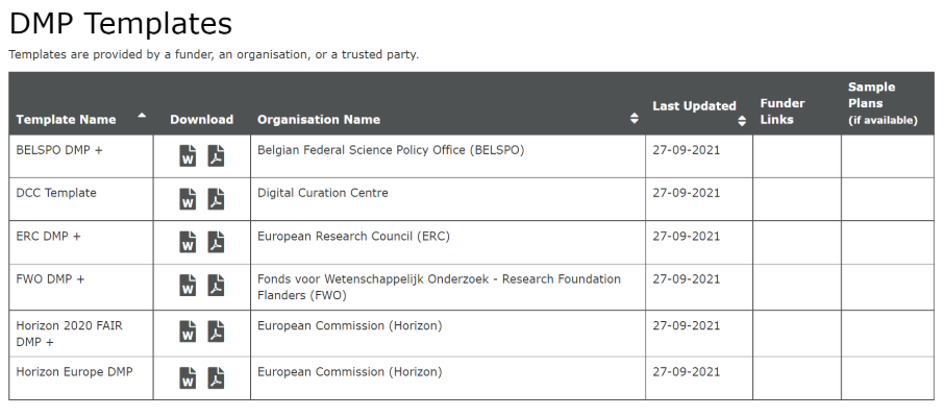
The end user can create a new plan based on these templates. He/she will only have to select a plan by clicking on “Action”.
How is a template structured?
The structure consists of three levels:
- Phase (includes sections)
- Section (includes questions)
- Questions
What are the components of a template?
- Questions grouped into sections.
- Sections grouped into phases.
- Guidance to assist the user for each question.
- Links and support service.
- Space for answers.
How can I modify/customise a template?
As an Admin, you can customise and modify templates by adding phases, sections and questions via the Admin menu by clicking on “Customisable template”.
For example, in a phase you have just created, you can add new sections by clicking on the “+” button of “Add a new section”. In each section you can add new questions via the “Add question” button.
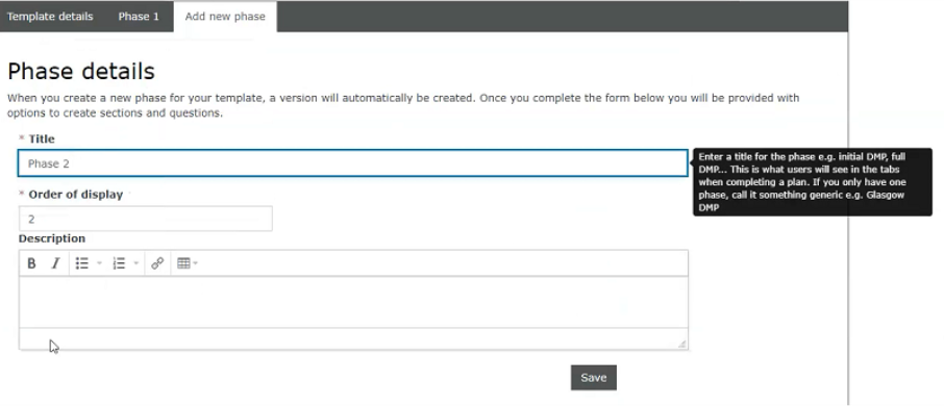
For the new questions, it is possible to change the format of the answer (e.g. Check box, Date, Dropdown, Radio buttons), add a default answer, adjust the theme of the question and adapt the specific guidance. You can also add conditional questions, etc.
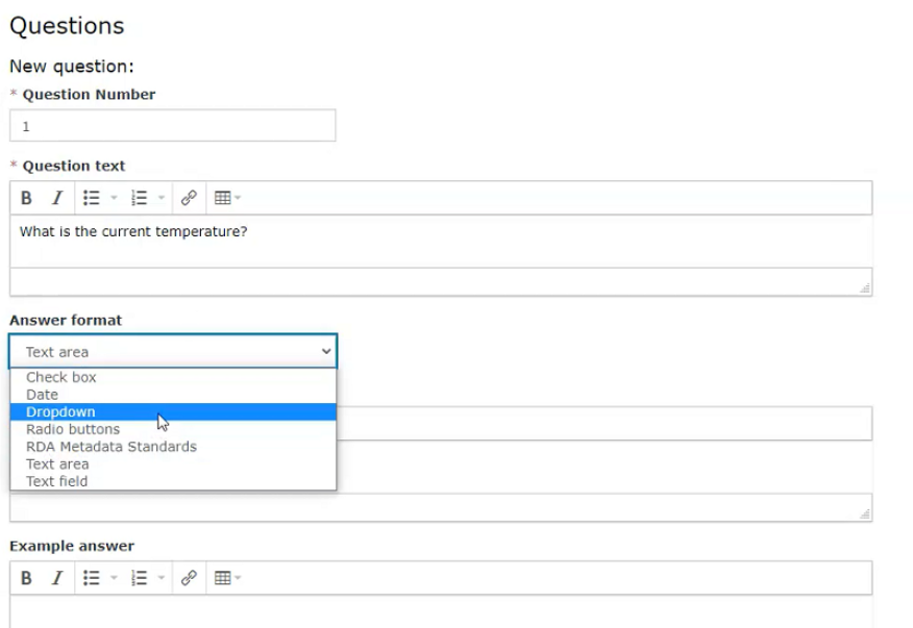
Once saved, the custom template can be found in the “Own templates” section in the Admin menu on the right. This template will be added to the default templates of your end users.
How can I create conditional questions?
This option allows you to add or remove questions based on the answers you choose.
Once you have saved all your questions, you will see the “Add conditions” option. By clicking on this button, you will see two options:
- Select a question or series of questions to hide or show in response to a single option or combination of options.
- Set an email notification to be sent in response to a single option or combination of options. Select the single option or combination of options from the drop-down menu.
What types of guidance are available?
-
Question-specific guidance: Guidance that is assigned to a specific question. Question-specific guidance can be added directly to a newly created template by filling in the “Guidance” box below the question, and updated or changed at the same place later on.
-
Themed guidance: In DMPonline, there are themes that represent the most common topics addressed in DMPs (e.g. data format, metadata and documentation, data repository). See the themes page for an overview. Themes work as tags to link questions and guidance.
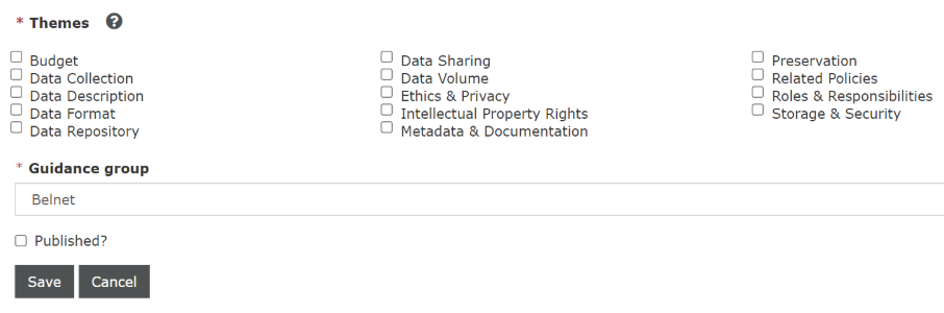
Each question in a template can be tagged with one or more themes. Administrators can then create guidelines per topic to be applied in all templates related to that topic at once. This avoids having to update the content of the guidelines every time a new version of a template is released.
Do Admin Users control which templates can be used by Users within their own organisation? Can Admin Users add their own templates?
Yes, admins can create their own organisational templates from scratch or they can add an organisational customization to preexisting funder templates in DMPonline.
Users can create plans from any template in DMPonline, also those from other organisations. Which template is used is selected in the plan creation wizard where a user selects an institution (by default their own) and a funder and if more than one option remains, they can select from a dropdown of templates. It is an important responsibility of the organisational admin to advise their researchers on how to use this wizard correctly to obtain the desired template.
There is also a link toward the DMP Wiki (note: Belnet is not the owner of the page and by consequence cannot edit it).
Guidance
How can I create guidance?
Guidance can be created on topics that are flagged with one or several tags, such as “Budget”, “Privacy” or “Ethics”. This tagging ensures that the right piece of guidance is displayed when a user opens guidance associated to a question in a DMP template that has the same tag(s).
-
In the Admin menu, click on “Guidance”, then click on “Create guidance” at the lower end of the Guidance list.
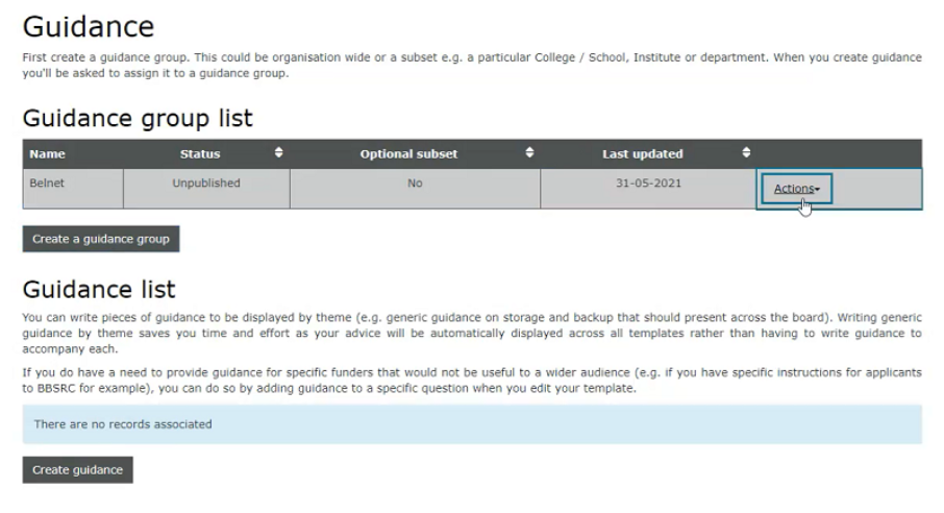
- Fill in the form and enter the content of the guidance in the text box.
- Choose one or more topics. Your guidance will be displayed to users whenever a question in a template is tagged with the corresponding topic(s).
- Select the “Guidance Group” to which the guidance relates.
- Check the box to publish it when you are ready to put it online.
Validation, lifecycle and lists
What is the Validation feature? How is it different than the Feedback feature?
The Validation feature can be found in all DMPs under the “Validation” tab. It makes it possible for DMP collaborators to provide formal validation on certain topics on a DMP. Topic Validation is a process to ensure that your plan meets the required standards and guidelines of the organisation.
To request validation, the validator must first have access to the DMP as an Editor or Co-owner. Once a validation request has been submitted, the validator can approve or reject the topic and provide feedback if needed. All validation requests and their outcomes are available in the Validation tab.
Each validation request results in a validation status being assigned to a specific topic within the DMP. The significance and consequences of the validation outcome depend on the processes and practices in place within the organisation. For example, a successful GDPR validation may indicate that the information is ready to be exported from DMPonline.be to the GDPR register, or to proceed assign an ulterior stage to the DMP.
The Request Feedback feature enables all users to request feedback for a specific plan. It sends a notification to Admins, or to a general research data management helpdesk if any, that a user needs feedback on their plan. Unlike Validation, Feedback is an informal review process: it does not result in a Validation status, approval decision, or other structured metadata associated with the DMP. Feedback may be provided within the application, if the person giving feedback has access to the DMP, or through other communication channels, depending on the organisations practices. Feedback can take place before a Validation is requested, for example.
What are lifecycle stages?
Lifecycle stages indicate where a DMP stands within the lifecycle of a research project. You can assign a lifecycle stage to any version of a DMP, including the Live Version.
As a project progresses, a DMP may move through several stages, from early drafts to finalized and archived versions. These stages can help demonstrate compliance with funder requirements, such as intermediate or provisional DMP deliverables, and support internal project management and review processes.
Can my organisation have custom stages lists or validation topics list?
By default, the list of validation topics is the following:
- General
- FAIR
- GDPR
- Data security
The default list of validation statuses is the following:
- Pending Review
- Approved
- Denied
- Rework Needed
Upon request to Belnet, Admins can ask to edit the validation topics list, their organisation’s lifecycle stages and validation statuses so they best match the needs and processes of their institutions.
The same is true for lifecycle stages, for which the default list is:
- Initial Draft
- Working Draft
- Intermediate
- Finalized
- Archived